

Blog
How to Protect Your Devices from Hackers & Malware

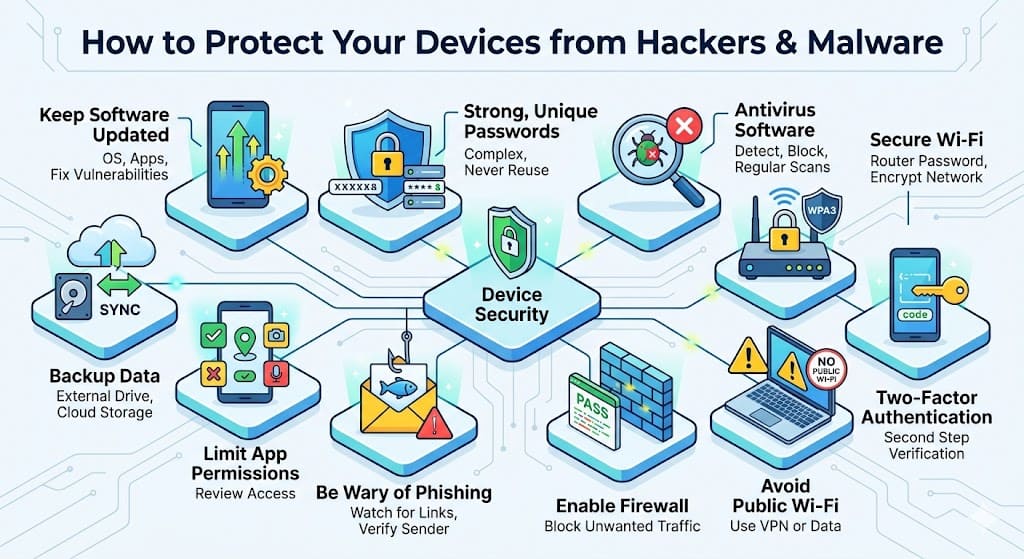
In today’s digital world, protecting your devices from hackers and malware is no longer optional—it is essential. Whether you are using a smartphone, laptop, or desktop computer, your personal data, financial details, and online identity are constantly at risk. Cybercriminals are becoming more advanced, using sophisticated techniques to steal information, track activity, and even lock your files for ransom. The good news is that with the right habits and tools, you can significantly reduce these risks and keep your devices safe.
One of the most important steps in protecting your devices is keeping your software updated. Operating systems, apps, and security tools frequently release updates that fix vulnerabilities. Hackers often exploit outdated software because it contains known weaknesses. By enabling automatic updates, you ensure that your device always has the latest security patches without requiring constant manual effort.
Using strong and unique passwords is another crucial defense. Many people still rely on simple passwords like “123456” or reuse the same password across multiple accounts. This makes it easy for attackers to gain access to several platforms if just one account is compromised. A strong password should include a mix of letters, numbers, and special characters. It is also advisable to use a password manager, which can generate and store complex passwords securely.
Installing reliable antivirus and anti-malware software adds an extra layer of protection. These programs are designed to detect, block, and remove harmful files before they can damage your system. Modern security software also provides real-time protection, scanning downloads, emails, and websites for threats. However, simply installing antivirus software is not enough—you must keep it updated and run regular scans to ensure ongoing protection.
Being cautious while browsing the internet plays a major role in staying secure. Many cyberattacks begin with phishing attempts, where hackers trick users into clicking malicious links or downloading infected files. These links often appear in emails, messages, or fake websites that look legitimate. Always verify the source before clicking on any link, and avoid downloading files from untrusted websites. If something seems suspicious, it is better to ignore it than take the risk.
Securing your Wi-Fi network is equally important. An unsecured network can allow unauthorized users to access your internet connection and potentially your devices. Make sure your Wi-Fi is protected with a strong password and uses modern encryption like WPA3 or WPA2. Changing the default router username and password adds another layer of security. Additionally, avoid using public Wi-Fi for sensitive activities such as online banking or logging into important accounts, as these networks are often not secure.
Enabling two-factor authentication (2FA) significantly strengthens your account security. With 2FA, even if someone manages to obtain your password, they still need a second verification step, such as a code sent to your phone or email. This simple feature can prevent unauthorized access and is highly recommended for all important accounts, including email, banking, and social media.
Regular data backups are often overlooked but are extremely important. In case your device gets infected with ransomware or malware, having a backup ensures that you do not lose your important files. Backups can be stored on external drives or secure cloud services. It is a good practice to schedule automatic backups so that your data is always up to date.
Another effective way to stay protected is by limiting app permissions. Many apps request access to data and features that are not necessary for their function. Reviewing and restricting permissions helps prevent unnecessary data exposure. Only grant access to what is essential, and uninstall apps that you no longer use.
Finally, awareness and vigilance are your strongest defenses. Technology alone cannot guarantee complete security if users are careless. Staying informed about common cyber threats and practicing safe online behavior can make a significant difference. Simple habits like logging out of shared devices, avoiding suspicious downloads, and monitoring your accounts regularly can help you detect and prevent threats early.
Protecting your devices from hackers and malware does not require advanced technical knowledge, but it does require consistency and awareness. By combining strong passwords, updated software, secure networks, and cautious online behavior, you can create a powerful defense against cyber threats. In an age where digital risks are constantly evolving, taking these steps ensures that your personal and professional data remains safe and secure.
