

Blog
Best WiFi Routers for Home & Office

A fast and stable internet connection is no longer a luxury—it is a necessity for both homes and offices. Whether you are working remotely, attending online meetings, streaming content, or managing a business, the quality of your WiFi router plays a crucial role in your overall internet experience. Choosing the right router can significantly improve speed, coverage, and reliability, while the wrong one can lead to constant buffering, dropped connections, and frustration.
Why Choosing the Right Router Matters
Many people invest in high-speed internet plans but fail to get the expected performance because of an outdated or low-quality router. The router acts as the backbone of your network, distributing internet signals to all connected devices. A good router ensures stable connectivity, better range, and efficient handling of multiple devices.
For homes with basic usage, a standard router may be sufficient. However, for offices or larger households with multiple users, smart TVs, laptops, and IoT devices, a more advanced router is essential to maintain consistent performance.
Types of WiFi Routers You Should Know
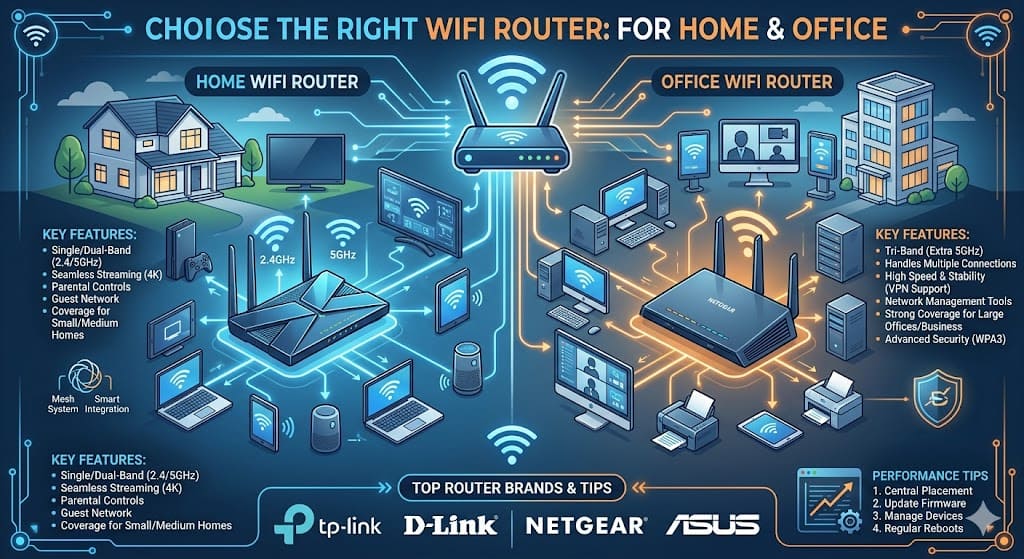
Understanding the types of routers available can help you make a better decision. Single-band routers operate on the 2.4GHz frequency and are suitable for light usage like browsing and emails. Dual-band routers offer both 2.4GHz and 5GHz frequencies, providing better speed and reduced interference. Tri-band routers go a step further by adding an extra 5GHz band, making them ideal for heavy usage and multiple users.
Mesh WiFi systems are another popular option, especially for large homes and offices. Instead of relying on a single router, mesh systems use multiple nodes to create a seamless network, ensuring strong connectivity in every corner.
Top Router Brands for Reliable Performance
When it comes to trusted networking solutions, brands like TP-Link, D-Link, Netgear, and ASUS are widely recognized for their performance and durability. These brands offer a range of routers catering to different needs, from budget-friendly options to high-performance devices for professional use.
Each of these brands focuses on delivering strong signal coverage, advanced security features, and user-friendly interfaces, making them suitable for both beginners and advanced users.
Features to Look for in a WiFi Router
When selecting a router, it is important to consider features that directly impact performance. Speed is one of the most important factors, especially if you have a high-speed internet plan. Look for routers that support the latest WiFi standards, as they provide faster and more efficient connectivity.
Coverage is another key aspect. A router with strong antennas or mesh capability ensures that the signal reaches all areas of your home or office. Security features such as WPA3 encryption and built-in firewalls help protect your network from unauthorized access.
Additionally, features like parental controls, guest networks, and mobile app management can enhance usability and provide better control over your network.
Best Routers for Home Use
For home users, the ideal router depends on the size of the house and the number of devices. A dual-band router is usually sufficient for small to medium-sized homes, offering a good balance of speed and affordability. For larger homes or multi-story buildings, a mesh WiFi system is highly recommended, as it eliminates dead zones and provides consistent coverage.
Modern home routers also support smart home integration, allowing you to connect and control devices such as smart TVs, security cameras, and voice assistants seamlessly.
Best Routers for Office Use
In office environments, the demand for stable and high-speed internet is much higher. Multiple users, video conferencing, cloud applications, and large file transfers require a router that can handle heavy traffic without slowing down.
Tri-band routers or advanced mesh systems are ideal for offices, as they can manage multiple connections efficiently. Business-grade routers also offer additional features like enhanced security, VPN support, and network management tools, ensuring smooth operations in professional settings.
Tips for Getting the Best Performance
Even the best router may not perform well if it is not set up correctly. Placing the router in a central location, away from walls and electronic interference, can improve signal distribution. Keeping the firmware updated ensures that the router runs efficiently and remains secure.
Managing connected devices and using the appropriate frequency band can also help in optimizing performance. Regular maintenance, such as restarting the router, can resolve minor issues and keep the network running smoothly.
Conclusion
Choosing the best WiFi router for your home or office is essential for a fast, reliable, and secure internet experience. With a wide range of options available, understanding your needs and selecting the right type of router can make a significant difference.
Whether you opt for a basic dual-band router or a high-performance mesh system, investing in a quality device ensures better connectivity, improved productivity, and a seamless online experience. As internet usage continues to grow, having a reliable router is one of the most important decisions for any modern household or workplace.
