

Blog
How to Secure Your Network

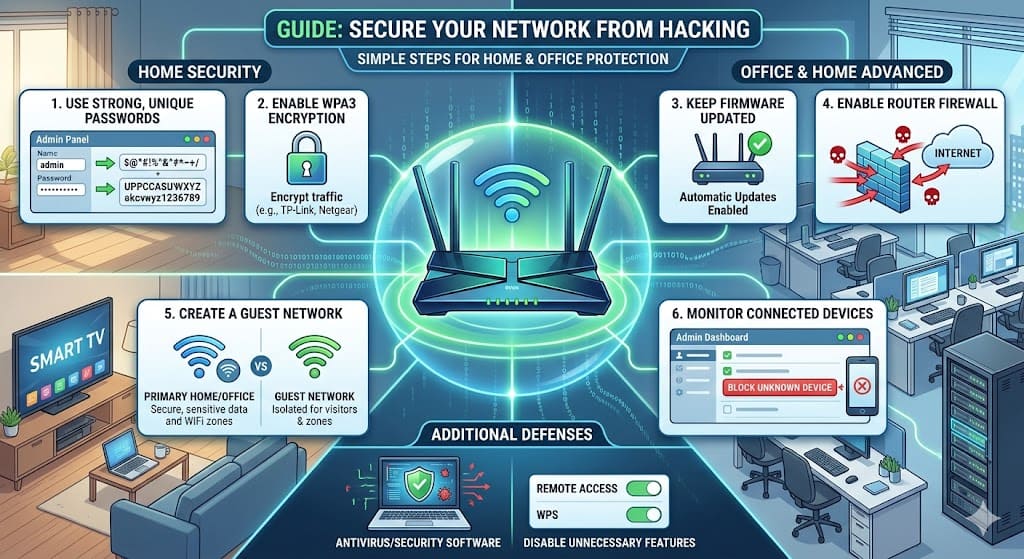
In today’s digital world, network security has become more important than ever. Whether you are using the internet at home or in an office, your network carries sensitive data such as personal information, financial details, and business files. Unfortunately, cyber threats and hacking attempts are increasing rapidly, and even a small security gap can expose your entire system. The good news is that securing your network does not always require advanced technical knowledge. With the right approach and simple preventive measures, you can protect your network effectively.
Understanding Network Security Risks
Before securing your network, it is important to understand how hacking usually happens. Most cyberattacks target weak passwords, outdated software, unsecured WiFi networks, or users who unknowingly click on malicious links. Hackers often look for easy entry points, and once they gain access, they can monitor activity, steal data, or even control connected devices.
For both home users and businesses, the risk is real. A slow internet connection, unknown devices connected to your network, or sudden system behavior changes can sometimes indicate unauthorized access. Being aware of these signs is the first step toward better security.
Use Strong and Unique Passwords
One of the simplest yet most effective ways to secure your network is by using strong passwords. Many people continue to use default router passwords or simple combinations, which makes it easy for hackers to break in. A strong password should include a mix of uppercase letters, lowercase letters, numbers, and special characters.
It is also important to change your WiFi password regularly and avoid sharing it unnecessarily. Modern routers from brands like TP-Link, Netgear, and D-Link offer advanced security settings that allow you to manage and update passwords easily.
Enable Network Encryption
Encryption is a key feature that protects your data from being accessed by unauthorized users. Always ensure that your WiFi network is secured with WPA3 or at least WPA2 encryption. This prevents hackers from intercepting the data being transmitted between your devices and the router.
An open or unsecured WiFi network is one of the biggest risks, especially in residential areas where multiple networks overlap. Enabling encryption ensures that only authorized users can connect to your network.
Keep Your Router Firmware Updated
Routers, like any other device, receive regular updates to fix security vulnerabilities and improve performance. Many users ignore these updates, leaving their network exposed to known threats.
Updating your router firmware ensures that security patches are applied and potential loopholes are closed. Most modern routers allow automatic updates, which makes it easier to maintain security without manual effort.
Set Up a Firewall for Protection
A firewall acts as a barrier between your internal network and external threats. It monitors incoming and outgoing traffic and blocks suspicious activity. Most routers come with a built-in firewall, but it is important to ensure that it is enabled.
For additional security, especially in office environments, you can use dedicated firewall software or hardware solutions. This adds an extra layer of protection and helps prevent unauthorized access.
Limit Access and Monitor Connected Devices
Another important step in securing your network is controlling who can access it. Many routers allow you to view all connected devices and block unknown ones. If you notice any unfamiliar device, it is important to remove it immediately and change your password.
Creating a guest network is also a good practice. Instead of sharing your main WiFi password with visitors, you can provide access through a separate network. This keeps your primary network secure while still allowing internet access for guests.
Avoid Public WiFi Risks
Using public WiFi networks can expose your data to hackers, especially if the network is unsecured. When accessing sensitive information such as banking or work-related data, it is always safer to use a secure private network.
For added protection, many users rely on tools like NordVPN or ExpressVPN, which encrypt internet traffic and hide user activity. This makes it much harder for hackers to intercept data.
Install Antivirus and Security Software
Even if your network is secure, individual devices connected to it can still be vulnerable. Installing reliable antivirus and security software helps detect and remove threats such as malware, spyware, and phishing attacks.
Keeping your system updated and scanning regularly ensures that potential threats are identified before they cause damage. This is especially important for office networks where multiple devices are connected.
Disable Unnecessary Features
Many routers come with features that may not be required for everyday use, such as remote access or WPS (WiFi Protected Setup). While these features offer convenience, they can also create security risks if not properly managed.
Disabling unnecessary features reduces the chances of unauthorized access and strengthens your overall network security.
Conclusion
Securing your network from hacking is not a one-time task but an ongoing process. With cyber threats becoming more advanced, it is essential to stay vigilant and adopt best practices to protect your data and devices.
By using strong passwords, enabling encryption, updating your router, and monitoring network activity, you can significantly reduce the risk of hacking. Whether for home or office use, a secure network ensures safe browsing, protects sensitive information, and provides peace of mind in an increasingly connected world.
