
Blog
SSD vs HDD: Which Storage is Better for Performance?

When it comes to choosing the right storage for your computer, the debate between solid-state drives (SSDs) and hard disk drives (HDDs) continues to be one of the most common dilemmas. Whether you are upgrading your laptop, building a gaming PC, or simply looking to improve your system’s speed, understanding the difference between these two storage types is essential. Performance, reliability, cost, and usage all play a role in deciding which option suits you best.
Understanding the Basics of SSD and HDD
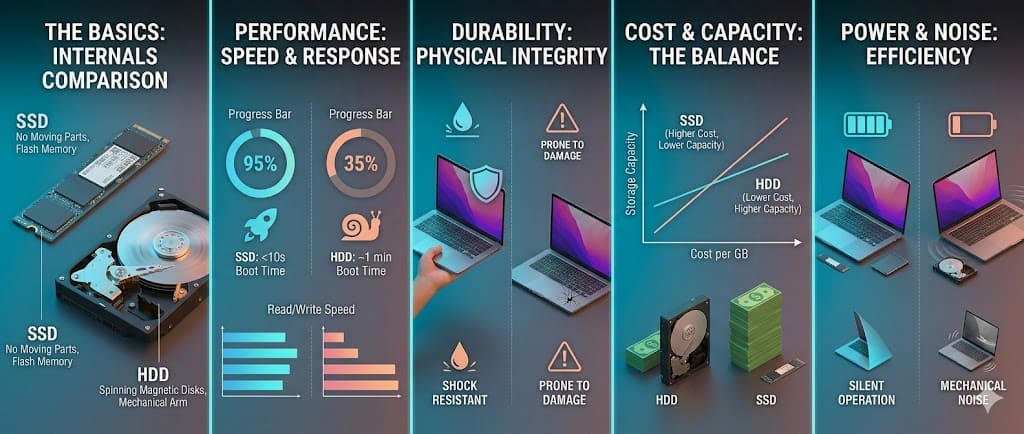
A hard disk drive (HDD) is the traditional storage device that has been used for decades. It works using spinning magnetic disks and a moving read/write head to access data. Because of its mechanical nature, it tends to be slower and more prone to wear over time. However, HDDs are still widely used because they offer large storage capacities at a lower cost.
On the other hand, a solid-state drive (SSD) uses flash memory to store data, similar to a USB drive but far more advanced. Since it has no moving parts, an SSD is significantly faster, more durable, and energy-efficient. Over the past few years, SSDs have become increasingly popular and are now considered the standard for modern computing devices.
Performance Comparison: Speed Makes the Difference
Performance is the biggest factor that separates SSDs from HDDs. An SSD can read and write data at speeds that are several times faster than an HDD. This directly impacts how quickly your system boots, how fast applications open, and how smoothly tasks are executed.
With an SSD, your computer can start in a matter of seconds, whereas an HDD-based system may take considerably longer. File transfers are also much quicker on an SSD, especially when dealing with large files such as videos, games, or software programs. For users who multitask or work with demanding applications, this speed advantage becomes highly noticeable.
HDDs, while reliable for basic storage, struggle to keep up with modern performance expectations. Tasks like launching heavy software or loading large game environments can feel slower, which can affect productivity and user experience.
Gaming and Work Performance
For gaming enthusiasts, storage plays a crucial role in overall performance. While an SSD does not directly increase frame rates, it significantly reduces loading times. Games installed on an SSD load faster, maps render quicker, and in-game transitions become smoother. This creates a more immersive and uninterrupted gaming experience.
In professional work environments, especially in fields like video editing, graphic design, and software development, SSDs provide a major advantage. Applications open faster, files load instantly, and system responsiveness improves dramatically. This not only saves time but also enhances workflow efficiency.
HDDs can still be useful for storing large game libraries or archived work files, but relying on them as the primary drive may limit performance.
Durability and Reliability
Durability is another area where SSDs clearly outperform HDDs. Since SSDs do not have moving parts, they are less likely to suffer physical damage from drops or shocks. This makes them a better choice for laptops and portable devices.
HDDs, due to their spinning disks, are more vulnerable to mechanical failure. Over time, wear and tear can affect their performance and reliability. While modern HDDs are built to last, they still carry a higher risk of failure compared to SSDs.
In terms of data safety, SSDs are generally considered more reliable for everyday use, especially in environments where movement or vibration is common.
Storage Capacity and Cost Considerations
Despite the performance benefits of SSDs, HDDs still have an advantage when it comes to cost per gigabyte. If you need a large amount of storage at a lower price, HDDs are the more economical option. They are ideal for storing backups, media collections, and files that are not frequently accessed.
SSDs, although more expensive, have become more affordable in recent years. Many users now choose a combination of both: an SSD for the operating system and important applications, and an HDD for bulk storage. This hybrid approach offers the best balance between performance and cost.
Power Efficiency and Noise Levels
SSDs consume less power compared to HDDs, which can lead to better battery life in laptops. They also operate silently because there are no moving components involved. This makes SSDs ideal for users who prefer a quiet working environment.
HDDs, on the other hand, produce noise due to the spinning disks and moving parts. While this noise is not always disruptive, it can be noticeable in quieter settings. Additionally, they tend to consume more power, which may slightly impact battery performance in portable devices.
Which One Should You Choose?
The choice between SSD and HDD ultimately depends on your needs and budget. If performance, speed, and reliability are your top priorities, an SSD is the clear winner. It is the best option for gamers, professionals, and anyone who values a fast and responsive system.
However, if you require large storage at a lower cost and do not mind slower speeds, an HDD can still be a practical choice. For many users, the ideal solution is to use both types of storage together, leveraging the strengths of each.
Conclusion
In the SSD vs HDD debate, SSDs stand out as the better option for performance. Their speed, durability, and efficiency make them the preferred choice for modern computing. While HDDs continue to serve a purpose in affordable large-scale storage, they cannot match the performance levels of SSDs.
As technology continues to evolve, SSDs are becoming more accessible and widely adopted. Investing in an SSD today is one of the most effective ways to upgrade your system and enhance your overall computing experience.


